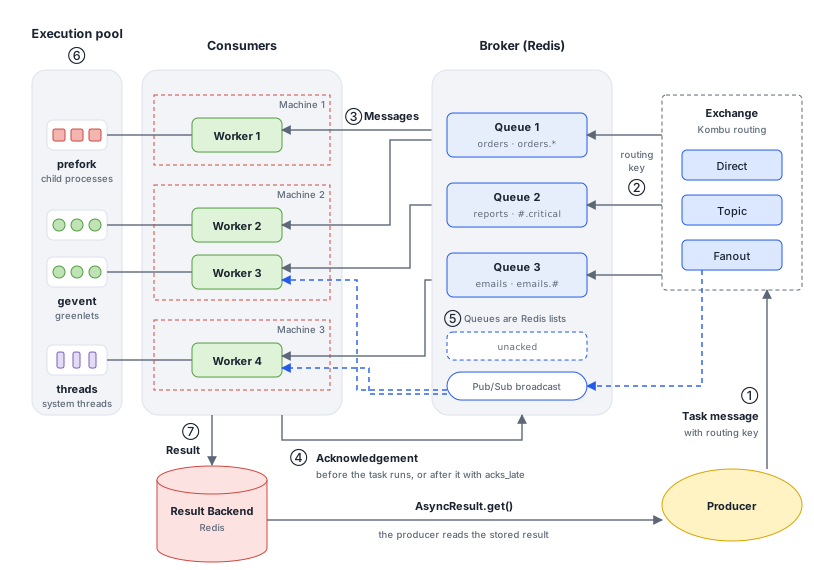
What Celery does
Celery is a distributed task queue for Python: it runs work outside the request that asked for it. It does not make your code faster. It raises throughput: how much work gets done in a given time. If one person finishes a certain amount of work in an hour, a second person changes how much gets done in that hour. Celery adds workers the same way, as more processes and machines taking tasks from the same queues.
Your application sends each task as a message to a broker, and workers take messages from the broker and run them. Celery does the messaging through the Kombu library. Many of its terms come from AMQP, the protocol RabbitMQ implements. Redis does not speak AMQP: Kombu imitates exchanges and queues on top of it. This post uses Redis as both the broker and the result backend.
Celery can also run tasks on a schedule with celery beat. This post doesn’t cover that.
Message flow
The numbers in the simulator follow one task message from the producer to the result:
- The producer calls
delay()orapply_async(). Celery creates the task ID, returns anAsyncResultstraight away and publishes the task message with a routing key. - Kombu matches the routing key against the queue bindings and pushes the message onto each matching Redis list. A fanout exchange broadcasts it over Redis Pub/Sub instead.
- A worker takes the message from its queue. Kombu keeps a copy in Redis, in a hash called
unacked, until the message is acknowledged. - The worker acknowledges the message: by default just before the task runs, or after it finishes with
acks_late. The acknowledgement clears the copy inunacked. - Messages no worker has taken wait in the queue’s list. An unacknowledged message from a lost worker returns there after the visibility timeout.
- The worker hands the task to its execution pool: a prefork child process, a gevent greenlet or a thread.
- The worker stores the result in the result backend, and the producer reads it with
AsyncResult.get().
Task
Tasks are the building blocks of Celery: functions that workers run. A plain function becomes a task with the @app.task decorator:
@app.task
def add(x, y):
    return x + y
Before a task retries or uses acks_late, check that it is idempotent: running it twice with the same arguments has the same effect as running it once. add(2, 2) always returns 4 and changes nothing else, so running it again is harmless. A task that charges a card is not.
Producer
The producer is the code that asks for a task to run, usually your web application or a script:
result = add.delay(4, 4) # publishes the task and returns an AsyncResultdelay() is a shortcut for apply_async(), which also takes options such as countdown, queue and routing_key.
Worker
A worker, Celery’s consumer, is a process that takes messages from one or more queues. It doesn’t run the task itself: it hands the task to its execution pool (⑥). Start one like this:
celery -A celery_demo worker --loglevel=INFO --queues=demo --concurrency=3 --hostname=worker1@%h--queues chooses the queues it reads, --concurrency how many tasks it runs at once, and --hostname names it; %h is the machine’s host name.
Message
A task message has headers, properties and a body. Since Celery 4 (message protocol 2, which replaced the protocol 1 layout shown in the earlier post), the task name and ID are headers, and the body holds only the arguments: (args, kwargs, embed), where embed carries callbacks and chains. With Redis the body is stored base64-encoded:
{
  "headers": {
    "task": "myapp.tasks.add",
    "id": "54086c5e-6193-4575-8308-dbab76798756",
    "argsrepr": "(4, 4)"
  },
  "properties": {
    "correlation_id": "54086c5e-6193-4575-8308-dbab76798756",
    "body_encoding": "base64"
  },
  "content-type": "application/json",
  "body": [
    [
      4,
      4
    ],
    {},
    {
      "callbacks": null,
      "errbacks": null,
      "chain": null,
      "chord": null
    }
  ]
}
The full message, as Redis stores it, is in Inspect a job in Redis.
Broker
The broker is the message server between producers and workers. It holds the queues and hands messages to workers. RabbitMQ and Redis are the common choices. RabbitMQ implements AMQP exchanges and queues itself; with Redis, Kombu builds them from Redis lists, sets and Pub/Sub. Choosing between brokers is a topic for another post.
Exchange
An exchange receives messages from producers and decides which queues get them, like a post office sorting letters by address. With Redis the exchange isn’t an object on the server: Kombu does the routing in the producer, using bindings it keeps in Redis.
Celery’s default exchange type is direct. The types decide how a message is matched:
| Type | Sends the message to |
|---|---|
direct | Queues whose binding key equals the routing key |
topic | Queues whose binding pattern matches the routing key: * is one word and # is any number of words, separated by dots. With Redis the dots next to # must be there: #.critical matches orders.critical but not critical |
fanout | Every bound queue. With Redis, only the workers listening at that moment, and the routing key still counts (see Routing key) |
RabbitMQ also has a headers exchange, which matches message headers instead of the routing key; Kombu’s Redis transport doesn’t support it.
With Redis, the bindings are stored in Redis but the exchange type isn’t. Kombu only knows that events is a topic exchange once the producer has declared it. Until then it treats the exchange as direct and compares keys exactly, so orders.critical matches neither orders.* nor #.critical, and the message is dropped without an error.
Sending to a queue by name declares it for you: Celery finds the queue in task_queues and declares its exchange first. Sending with only exchange and routing_key declares nothing, so declare the exchange yourself:
from kombu import Exchange

events = Exchange('events', type='topic')

add.apply_async((4, 4), queue='critical', routing_key='orders.critical')  # Celery declares events
add.apply_async((4, 4), exchange='events', routing_key='orders.critical', declare=[events])
Broadcast queues are the exception: Celery never declares their exchange, even when you send by queue name. Pass declare=[Exchange('bcast', type='fanout')], or the message lands in a Redis list that no worker reads.
In the simulator, a topic message with the routing key orders.critical matches both orders.* on Queue 1 and #.critical on Queue 2, so two workers run it.
Routing key
The routing key is the address on the message. The binding key is the address on a queue’s binding to an exchange. The exchange compares the two: for direct they must be equal, and for topic the binding key is a pattern. On RabbitMQ, fanout ignores the routing key. On Redis it doesn’t: Kombu sends fanout messages over Redis Pub/Sub, on a channel named after the exchange and the routing key, such as /0.bcast/celery in database 0. A worker listens on the channel for its own binding key, so it only gets messages sent with that key. Celery gives broadcast queues the key celery and uses it when you send by queue name, so this only matters if you pass a different routing_key.
Queue
A queue holds messages until a worker takes them. Binding a queue to an exchange with a key is what connects the two:
from kombu import Exchange, Queue

orders_exchange = Exchange('orders', type='direct')
app.conf.task_queues = [
    Queue('orders', orders_exchange, routing_key='orders'),
]
With Redis, each queue is a Redis list named after the queue.
Result backend
The result backend stores each task’s state and return value, so the producer can read them with AsyncResult. Celery supports Redis, databases through SQLAlchemy or the Django ORM, Memcached, and an RPC backend for RabbitMQ, among others. With Redis, a task’s result is a key named celery-task-meta-<task id>.
If a task never stores a result, AsyncResult reports PENDING, which Celery defines as an unknown state. What get() does depends on why:
- The task was lost or never reached a queue:
get()waits until its timeout. - The task ignores its result (
ignore_result): theAsyncResultthatapply_async()returned knows this, soget()returnsNoneat once.
Content type
The content type says how the message body is serialised. Celery supports JSON, pickle, YAML and msgpack, and accepts only JSON by default. A worker refuses messages in a content type it doesn’t accept.
JSON can’t carry Python objects such as an Enum: pass plain values, or register a custom serializer. Pickle can run arbitrary code when it is loaded, so accept it only when every producer is trusted.
app.conf.task_serializer = 'json'
app.conf.accept_content = ['json']
Acknowledgement
By default a worker acknowledges a message just before the task runs. This is early acknowledgement: if the worker dies during the task, the message is already gone. With acks_late, the worker acknowledges after the task finishes, so a lost worker’s task runs again. Use it only for idempotent tasks.
@app.task(acks_late=True)
def add(x, y):
    return x + y
Set task_acks_late = True to do the same for every task.
Prefetch
A worker takes more messages than it is running. Each worker reserves up to worker_prefetch_multiplier × its concurrency, and the default multiplier is 4, so a worker with 3 processes reserves up to 12 messages. With the default early acknowledgement, that is on top of the 3 tasks it is running, which are already acknowledged; with acks_late, the 12 include them. Reserved messages are delivered but not yet acknowledged: in Redis they sit in unacked until the pool starts them, and if the worker dies they return to the queue after the visibility timeout.
With long tasks, one busy worker can sit on reserved messages while other workers are idle. Set the multiplier to 1 so each process reserves only one task at a time; with acks_late as well, a worker reserves only as many tasks as it has processes:
app.conf.worker_prefetch_multiplier = 1
app.conf.task_acks_late = True
Tasks with an ETA or countdown are fetched straight away too and wait in the worker’s memory until they are due. Many of them can use a lot of memory, and a countdown longer than the visibility timeout can get the task delivered again.
The simulator follows one message at a time, so it doesn’t show prefetch.
Execution pool
The pool is where a task actually runs. Each worker chooses one when it starts, with --pool (-P):
prefork, the default, runs tasks in child processes. It suits CPU-bound work.geventandeventletrun many tasks as greenlets. They suit I/O-bound work such as calling APIs.threadsruns tasks in a thread pool.soloruns one task at a time in the worker process itself.
Celery doesn’t run asyncio coroutines as tasks natively.
When a worker fails
What happens to a task when its worker fails depends on when the message was acknowledged and on what failed:
| Failure | Default | acks_late | acks_late + task_reject_on_worker_lost |
|---|---|---|---|
| The child process running the task is killed | Already acknowledged: not run again | Acknowledged anyway: not run again | Requeued and run again |
| The whole worker is lost | Running task lost; prefetched tasks are delivered again | Delivered again after the visibility timeout | Delivered again after the visibility timeout |
Celery acknowledges a killed child’s task even with acks_late, so that a task that crashes its process, or is killed on purpose or for using too much memory, doesn’t loop for ever. task_reject_on_worker_lost asks for it to run again anyway.
A lost worker’s unacknowledged messages stay in unacked until the visibility timeout passes, one hour by default, and then return to their queue.
When no queue matches
If no binding on the exchange matches the routing key, Kombu discards the message without an error. The producer already has an AsyncResult, though: its state stays PENDING, and get() waits for ever unless you give it a timeout. A typo in a routing key fails silently, so pass a timeout and watch your queue lengths.
This happens when the task names an exchange, in the call or in task_routes. With a routing key alone, Celery sends the task straight to the default queue, celery, and the key is not used:
add.apply_async((4, 4), exchange='orders', routing_key='invoices')  # discarded: no binding matches
add.apply_async((4, 4), routing_key='invoices') # runs from the celery queueresult.get(timeout=10) # raises celery.exceptions.TimeoutErrorRunning Celery in production
These lessons come from a production system that ran many queues of I/O-heavy jobs on Celery and Redis. Each one ties back to a part of the architecture above.
Don’t lose work
Turn on the three settings from When a worker fails together, so a task is acknowledged only after it finishes, a killed process requeues its task, and a worker holds no more than it is running:
app.conf.task_acks_late = True
app.conf.task_reject_on_worker_lost = True
app.conf.worker_prefetch_multiplier = 1
Every task can now run more than once, so make tasks idempotent, and size the visibility timeout to match.
Size the visibility timeout
Redis has no acknowledgements of its own, so Kombu builds them. When a worker takes a message from a queue’s list, Kombu copies it into the unacked hash and adds its delivery tag to the unacked_index sorted set, scored with the time it was delivered. The ack removes both entries.
The visibility timeout is how long a delivered message may stay unacknowledged. Every running worker regularly looks for entries older than the timeout and pushes them back onto their queue, where any worker can take them again. The default is one hour.
A delivered message comes back in four cases:
- Warm shutdown (
SIGTERM): the worker finishes its running tasks, then puts the messages it had reserved back as it exits. It doesn’t wait for the timeout. - Crash,
SIGKILLor power loss: nothing puts the messages back, so they wait inunackeduntil the timeout passes and a worker that is still running finds them. - A task still running after the timeout, with
acks_late: it hasn’t been acknowledged, so the next time a worker checks for expired messages, it puts this one back on the queue and the task runs again: on an idle worker at the same time, or on the busy worker once the first copy ends. A task that finishes before that check is acknowledged normally, so running past the timeout risks a second run rather than always causing one. - An ETA, countdown or retry delay longer than the timeout: the worker holds the message unacknowledged while it waits, so it is delivered again, and again, in a loop.
Set it longer than your longest task and your longest ETA, countdown or retry delay. A longer timeout only delays the return of tasks lost in a crash. Set the same value for the broker and the result backend, as the Celery Redis guide asks:
app.conf.broker_transport_options = {'visibility_timeout': 18000}
app.conf.result_backend_transport_options = {'visibility_timeout': 18000}
Every application on the same Redis needs the setting. If they differ, the shortest timeout wins, and an application that doesn’t set it brings in the one-hour default. For tasks that should run days from now, schedule them with celery beat or keep them in your database instead of using a long countdown.
To see it in Redis, list the delivered, unacknowledged messages and when each was delivered. The score is a Unix timestamp; once it is older than the timeout, the message is due to go back:
redis-cli HLEN unacked
redis-cli ZRANGE unacked_index 0 -1 WITHSCORES
The simulator shortens the one-hour wait to a pause and says so in the event list.
Set a soft limit below the hard limit
A soft time limit raises SoftTimeLimitExceeded inside the task, which can catch it and clean up. A hard time limit kills the process and replaces it. If both are equal, they fire together and the cleanup never runs, so leave a gap:
from celery.exceptions import SoftTimeLimitExceeded

@app.task(soft_time_limit=150, time_limit=180)
def export_report(report_id):
    try:
        build_report(report_id)
    except SoftTimeLimitExceeded:
        remove_partial_report(report_id)
        raise
A task stopped by a time limit counts as failed. With acks_late it is still acknowledged, because task_acks_on_failure_or_timeout is on by default, so it isn’t run again unless it retries.
Time limits depend on the pool. The Celery workers guide lists them only for prefork and gevent, and gevent has no soft limit and doesn’t enforce the hard limit while a task blocks. On a threads or gevent worker, put the timeout in the task’s own calls instead, such as the timeout of an HTTP client.
Retry with backoff
For errors that usually pass, such as timeouts from another service, retry automatically with an exponential backoff and jitter, and cap the number of attempts:
@app.task(autoretry_for=(ConnectionError,), retry_backoff=True,
          retry_backoff_max=600, retry_jitter=True, max_retries=5)
def fetch_page(url):
    ...
Each retry is a new message with the same task ID and a countdown. Like any countdown task, it waits in the worker’s memory until it is due, so keep retry_backoff_max (the longest wait between retries, in seconds) below the visibility timeout.
Split workers by workload
Run separate workers for separate kinds of work, each reading its own queues with the pool that suits it, the way each machine in the simulator runs its own pool:
- I/O-heavy tasks, such as calling APIs, spend most of their time waiting, so a
threadsorgeventpool runs many at once. These pools don’t support soft time limits. - CPU-heavy tasks get
preforkprocesses, about one per CPU core.
For example, one worker for each:
celery -A proj worker --queues=io --pool=threads --concurrency=10 --hostname=io@%h
celery -A proj worker --queues=cpu --pool=prefork --concurrency=4 --hostname=cpu@%h
Send each task to its queue with task_routes or the queue option, and scale each group of workers on its own.
Know what rate limits do
A task’s rate_limit, such as "100/m", applies to each worker separately and counts tasks per second, minute or hour. It doesn’t cap how many run across the cluster at once. For a global limit, give the task its own queue and divide the limit by the number of workers that read that queue.
Say a partner API allows 10 calls a minute and 5 workers read the partner queue. Each worker gets 10 ÷ 5 = 2/m:
app.conf.task_routes = {'myapp.tasks.call_partner': {'queue': 'partner'}}
app.conf.task_annotations = {'myapp.tasks.call_partner': {'rate_limit': '2/m'}}- Divide by workers, not concurrency. The limit is shared by all of a worker’s processes, so a worker with 8 processes still starts at most 2 of these tasks a minute.
- It limits starts, not running tasks. At
2/m, a task that takes 5 minutes can have 10 running on one worker at once, if its concurrency allows. Concurrency is what caps how many run at once. - Round down, in a smaller unit. 10 a minute over 3 workers is 3.33 each.
3/mwastes one call a minute; 10/m is 600/h, so200/heach keeps the full limit. - Recompute when workers change. A sixth worker takes the total to 12 a minute, and a lost worker drops it to 8. You can change the limit on running workers with
app.control.rate_limit('myapp.tasks.call_partner', '2/m'). It applies to tasks a worker receives after the change. Tasks already waiting in the worker keep the old limit until they start, so a lower limit takes full effect only once that backlog has started. - Keep the backlog shorter than the visibility timeout. While tasks wait for their turn, the worker holds their messages reserved and unacknowledged. If the backlog takes longer than the visibility timeout to start, the waiting messages are delivered again and some tasks run twice.
If the number of workers changes often, as with autoscaling, use distributed rate limiting instead: all workers share one limiter, so the limit holds however many of them run.
Drop stale tasks
Give tasks that lose their value with time an expiry. When a worker receives an expired task, it marks it REVOKED instead of running it:
refresh_listing.apply_async(args=(listing_id,), expires=3600)Watch events and queue depth
Workers can publish an event for every task, from sent to succeeded or failed, and a heartbeat. Turn them on, then use Flower or an exporter for Prometheus to track throughput, failures, runtimes and which workers are alive:
app.conf.worker_send_task_events = True
app.conf.task_send_sent_event = True
Queue depth is the other number to alert on. With Redis it is the length of the queue’s list, and keeping the broker and the result backend in separate Redis databases keeps these checks simple:
redis-cli -n 0 LLEN celeryShut down gracefully
On SIGTERM a worker stops taking tasks and finishes the ones it is running. Give your process manager, such as supervisord or Kubernetes, a stop timeout longer than your longest task. If it falls back to SIGKILL, the worker is lost with its tasks, which is the case in When a worker fails.
Inspect a job in Redis
With Redis as the broker and result backend, you can see each stage of a job with redis-cli. With the default setup, tasks go to a queue named celery.
Waiting in the queue
redis-cli LRANGE celery 0 -1Each entry is a JSON envelope. This one is add.delay(4, 4):
{
  "body": "W1s0LCA0XSwge30sIHsiY2FsbGJhY2tzIjogbnVsbCwgImVycmJhY2tzIjogbnVsbCwgImNoYWluIjogbnVsbCwgImNob3JkIjogbnVsbH1d",
  "content-encoding": "utf-8",
  "content-type": "application/json",
  "headers": {
    "lang": "py",
    "task": "myapp.tasks.add",
    "id": "54086c5e-6193-4575-8308-dbab76798756",
    "shadow": null,
    "eta": null,
    "expires": null,
    "group": null,
    "group_index": null,
    "retries": 0,
    "timelimit": [
      null,
      null
    ],
    "root_id": "54086c5e-6193-4575-8308-dbab76798756",
    "parent_id": null,
    "argsrepr": "(4, 4)",
    "kwargsrepr": "{}",
    "origin": "gen4321@laptop",
    "ignore_result": false
  },
  "properties": {
    "correlation_id": "54086c5e-6193-4575-8308-dbab76798756",
    "reply_to": "c1a7e0f2-3b9d-3c41-9a1e-6f0d2b7a8e55",
    "delivery_mode": 2,
    "delivery_info": {
      "exchange": "",
      "routing_key": "celery"
    },
    "priority": 0,
    "body_encoding": "base64",
    "delivery_tag": "9b0f3d52-8c47-4e1a-b2d6-4a5e7c1f0d93"
  }
}
The arguments are in body, base64-encoded:
echo 'W1s0LCA0XSwge30sIHsiY2FsbGJhY2tzIjogbnVsbCwgImVycmJhY2tzIjogbnVsbCwgImNoYWluIjogbnVsbCwgImNob3JkIjogbnVsbH1d' | base64 --decode[[4, 4], {}, {"callbacks": null, "errbacks": null, "chain": null, "chord": null}]Taken by a worker
redis-cli HGETALL unackedEach value is the same message with its exchange and routing key. With early acknowledgement, a running task has already left this hash, but tasks a worker has prefetched and not yet started are still here. With acks_late, running tasks stay until they finish.
The result
redis-cli GET celery-task-meta-54086c5e-6193-4575-8308-dbab76798756{
"status": "SUCCESS",
"result": 8,
"traceback": null,
"children": [],
"date_done": "2026-11-05T09:30:00.412345+00:00",
"task_id": "54086c5e-6193-4575-8308-dbab76798756"
}Dev Workbench does this on your Mac: paste the message into JSON Tools to format it and query headers with jq, such as .headers.task; decode the body in Text Encoding; read date_done and compare againt local time or other timezones that you are working in Epoch Time; and check the task ID in the UUID & ULID Generator.
DEV WORKBENCH FOR MAC
Read Celery messages on your Mac.
Dev Workbench is a native Mac app with focused developer tools. Paste a message from Redis, format and query it with jq, decode its body and check its timestamps. Your data stays on your Mac.
- Format and query JSON. Pretty-print a message and pull out headers with jq, with field suggestions as you type.
- Decode and convert. Decode base64 bodies, read ISO timestamps and inspect task IDs in separate workbenches.
Free download. Requires macOS 14 or later.